Local AI Coding Agents Are Finally Good Enough
Beto, July 9, 2026 · 26,260 views
Local AI coding agents have struggled to deliver a good experience on personal computers—until now. This video covers the new Queen 3.6 model, a 27 billion parameter local LLM optimized for agentic coding, vision, and tool calling. It runs offline on your machine with reasonable hardware requirements and offers surprisingly strong coding and multimodal capabilities.
If you want to run AI coding assistants without relying on cloud APIs, or need offline AI tools for coding and image recognition, this video shows how to get started with Queen 3.6 using LM Studio. I also demo real examples like Minesweeper and Snake games generated by the model, plus how to integrate it with your local development environment.
What's inside
- Challenges running local LLMs before Queen 3.6
- Hardware requirements and Mac compatibility
- Using LM Studio to download and run Queen 3.6
- Agentic coding and multimodal features (vision and tool calling)
- Integrating Queen 3.6 with local development tools like VS Code
- Real coding demos: Minesweeper, Snake game, and UI tasks
- Performance notes and concurrency support
- Limitations and practical caveats
Challenges running local LLMs before Queen 3.6
Running local large language models on personal computers has historically been a poor experience. Models were too large or slow, and often failed to deliver useful results. Before Queen 3.6, local LLMs were mostly experimental and not reliable for real coding tasks.
Queen 3.6 changes this by offering a 27 billion parameter model optimized for agentic coding and multimodal inputs. It uses less VRAM and can run decently on high-end consumer hardware, making local AI coding agents finally practical for offline use.
Hardware requirements and Mac compatibility
To run Queen 3.6 locally, you need a powerful machine. On Mac, an Apple M3 Ultra with 96 GB VRAM and 80 cores works well. For Windows or Linux, an RTX 4090 GPU with at least 24 GB VRAM is recommended. The minimum 16 GB VRAM is possible but very tight.
I tried running it on a MacBook Pro with 18 GB VRAM and it failed, so having enough RAM and GPU power is essential. This means Queen 3.6 is not for every laptop but is accessible on high-end desktops or workstations.
Using LM Studio to download and run Queen 3.6
LM Studio is my favorite desktop app for managing local LLMs. It makes downloading, running, and interacting with models easy. After installing LM Studio, enable developer mode to access advanced features.
You can search for Queen 3.6 in the model tab and download the ~20 GB model file. Once loaded, you can start chatting with the model inside LM Studio. It supports multiple concurrent sessions and lets you monitor token generation and logs in real time.
Agentic coding and multimodal features (vision and tool calling)
Queen 3.6 is a reasoning model that supports vision and tool calling. You can paste images for the model to recognize and ask it to perform tasks using external tools, like checking weather for a location.
This multimodal ability lets you combine code generation with image understanding and API calls, all offline. For example, I showed the model recognizing SF Symbols icons from a screenshot and naming them correctly.
Integrating Queen 3.6 with local development tools like VS Code
Queen 3.6 can expose an OpenAI-compatible API endpoint locally. By enabling the API endpoint in LM Studio and configuring your local VS Code settings to point to it, you can use the model as a drop-in replacement for OpenAI’s API.
This lets you run AI coding assistants inside VS Code without internet access. You just add the required JSON configuration for modalities and endpoint URL, then start coding with the local model powering completions and chat.
Real coding demos: Minesweeper, Snake game, and UI tasks
I demonstrated Queen 3.6 generating full HTML Minesweeper and Snake games from prompts. The Snake game even supports changing the fruit emoji dynamically.
The model also helped create UI components like cards displaying user info, and recognized my real code base to assist with complex tasks. These demos show the model’s practical coding power offline.
Performance notes and concurrency support
Queen 3.6 performs close to cloud models like OpenAI’s GPT-4.5 for agentic coding, though slightly slower. LM Studio supports multiple concurrent sessions, so you can run several chats or coding tasks in parallel.
You can enable cache quantization to speed up responses at the cost of some quality. The model sometimes takes a while to respond, but overall the experience is smooth and reliable on a powerful machine.
Limitations and practical caveats
While Queen 3.6 is impressive, it’s not a full replacement for the latest cloud models like OpenAI’s GPT-4.8. It struggles with very complex mobile app code and occasionally generates nonsensical imports.
Also, it requires high-end hardware and a large download. The UI feedback when waiting for responses can be less interactive than cloud services. Still, for offline coding assistance and experimentation, it’s a major step forward.
Resources
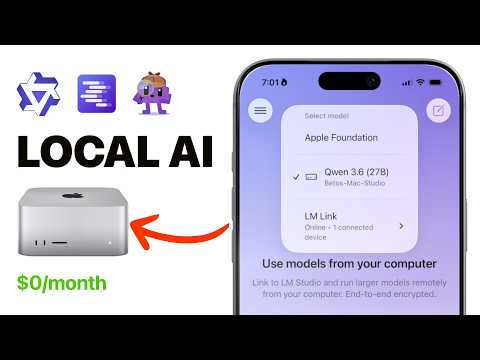
YouTubeLocal AI Coding Agents Are Finally Good Enough
Watch Beto's full demo of Queen 3.6 running locally with agentic coding and vision.
CourseReact Native course
Learn to build React Native apps with AI-powered coding assistance.
Premium resourcePro membership
Get early access to AI tools and exclusive coding content.
NewsletterBeto's Newsletter
Stay updated on AI, React Native, and coding tips.
Like this article? Get the rest of the library plus weekly React Native tips. Free.