Build Your First iPhone Game with Codex
Beto Moedano, October 2026
I built Space Rider with Codex and Xcode. Copy the guidelines and prompts below to build your own native iPhone game. No signup required.
My build prompts are cleaned up for reuse, with setup prompts and implementation checks added.
What you'll need
A Mac, Xcode, Codex with image creation, and an iPhone. The stack is Swift, SpriteKit, UIKit, and Core Motion. Gameplay runs locally without an API key. Start with one course.
1. Create your asset guidelines
Define the look before generating assets. I used a Page in ChatGPT Space; a Markdown file works if your account lacks Page access. Replace the brackets and attach your references:
Help me create asset guidelines for a native 2D iPhone game.

Idea: [describe the game in one sentence].
Player: [character or vehicle].
Main action and controls: [what the player does].
Setting and mood: [world, lighting, realistic or stylized].
First version: [one small level and its finish condition].
References: [attach images and explain what I like about them].

Create a Page in ChatGPT Space called “[Game] Asset Guidelines”.
Include visual direction, palette and landmarks, the player and
playable surface, the asset package, parallax layers, consistency
rules, and acceptance checks at phone size.

Separate generated artwork from things the game should draw in code.
For each asset, specify its view, transparency, size target, intended
screen size, layer, and pivot if needed. Label assumptions and future
ideas. Ask only for essential missing decisions.My guidelines, ready to copy
Here's my Page's reusable content, including the later track-gap decision. Treat dimensions and movement rates as starting points.
SPACE RIDER: ASSET GUIDELINES

Goal
A bright, detailed 2D motorcycle game on a fictional route through
space. Build one Earth course first. Expand to Mars after it works.

Visual direction
- Smooth, realistic materials with a clean science-illustration feel.
- Strict side view for the bike, wheels, and track.
- Consistent upper-left sunlight, readable highlights and open shadows.
- White/silver bike, cobalt accent, black tires, helmeted rider.
- Bike near the left third. Leave room ahead for jumps and landings.
- Keep detailed scenery below or behind the riding line.
- Avoid heavy glare, dense particles, baked-in text, and company logos.
- Worlds are recognizable, but routes and distances are fictional.

Palettes and landmarks
- Earth: white riding line (#F7FBFF), blue horizon, white clouds,
  cyan atmospheric rim, small distant Moon, sparse satellites.
- Mars: coral riding line (#FF644F), rust/terracotta scenery,
  dusty horizon, a rover resting on terrain, small moon details.
- Keep the bike design the same between worlds.

Bike and playable track
- Separate the body/rider from the front and rear wheels.
- Use one accepted full-bike reference for proportions and axles.
- Generate the visible track and collision surface from the same
  level geometry in code. Include deliberate gaps for jumps.
- Start with a thin line around 3–5 logical points and tune on device.
- Decorative terrain does not become the playable road.
- Start with the same forgiving handling in both worlds.

Asset package: proposed source-master targets
- Body/rider: 2048 x 2048 PNG, transparent, facing right, no wheels.
- Wheels: 1024 x 1024 PNG each, transparent, centered axle,
  matching intended diameter and tire design, no ground shadow.
- Moon: 2048 x 2048 PNG, isolated with transparency.
- Horizon/terrain: about 4096 x 2048 per wide layer, no bike,
  track, HUD, Moon, or landmarks baked into the background.
- Satellite/rover: 1024 x 1024 PNG each, transparent.
- Stars, track, UI text and simple shapes: create in code.

Check actual generation dimensions. Keep source masters and make
smaller runtime exports for their intended display size. Do not assume
a requested size was delivered or that a wide image is seamless.

Parallax: starting movement relative to camera travel
- Stars: 0–1%.
- Distant Moon/planet: 2–4%.
- Planet horizon: 6–12%.
- Distant terrain/landmarks: 15–30%.
- Optional nearer terrain: 30–50%.
- Gameplay track: 100%.
Place a rover in the same layer as its supporting terrain. Keep the
bike and landing zone clear. Inspect motion and seams while playing.

Consistency
1. Accept one scene reference and one full-bike assembly reference.
2. Attach those images plus the nearest accepted asset to new requests.
3. Preserve palette, camera, lighting, proportions, and detail density.
4. Refine one observed issue at a time and save versions separately.
5. Review new assets at gameplay size before adding them to the pack.
6. Reuse the exact bike across worlds instead of regenerating it.

Asset manifest
Record filename/version, actual pixel dimensions, intended screen
size, transparency, pivot/axle, layer, references, and prompt.

Acceptance checks
- Body and wheels share perspective, scale, and lighting.
- Axles align with the intended attachment points.
- Cutouts have real transparency, no baked checkerboard or halos.
- Backgrounds contain no accidental bike, track, or UI.
- The bike and next landing remain readable on a phone.
- Wheels meet the visible track in the running game.2. Create a scene and refine it
Attach your guidelines and generate a composition reference:
Read the attached asset guidelines. Create one landscape concept scene
for the Earth course: an original side-view electric motorcycle above
a thin white riding line, a sunlit blue Earth horizon below it, a small
Moon in the distance, and sparse satellite detail.

Use the agreed bright lighting and realistic materials. Keep space
ahead for a jump and a clear landing zone. This is a composition
reference, not a playable level or final sprite sheet.
Report the actual image dimensions.My actual refinement:
Let's keep the one with the sun, just reduce the glare.
Keep everything else.In a new chat, attach the exact image. My selected concept was 1672 × 941 pixels.
3. Turn the bike into usable parts
Start with a full-bike reference. Then separate the wheels so they can rotate:
Using this scene and asset guidelines, create a clean, complete
side-view reference of the motorcycle and helmeted rider, facing right,
with both wheels visible. Preserve the chosen design, lighting, and
proportions. Use a transparent background.

This image will define wheel spacing and attachment points for the
separate game assets.The assembly reference establishes the design and wheel spacing before generating separate parts.
I used subagents for independent asset requests, all with the same references:
Create [ONE ASSET] using the attached approved scene and
[NEAREST APPROVED ASSET] as references. Follow our asset-guidelines Page.

Preserve the camera view, upper-left lighting, palette, proportions,
and level of detail. Keep it readable at its intended phone size.

Requirements: [subject, facing direction, transparency, padding,
master size target, intended screen size, pivot, and scene layer].

Exclude unrelated objects, text, UI, and the riding line. Preserve the
existing design. Save a new version and report the actual pixel
dimensions. Record the prompt and references in the asset manifest.Generate the body/rider, front wheel, rear wheel, Earth horizon, Moon, and satellite separately.
My cutouts were 1254 × 1254; the Earth background was 1774 × 887 and non-seamless. Check actual sizes, transparency, and axle alignment. Record corrected pivots in the manifest.
4. Build one playable course in Xcode
Open your Xcode project in Codex. Attach the guidelines, assets, and manifest:
Read our asset-guidelines Page and inspect this Xcode project.

Build a native iPhone game with Swift, SpriteKit, and Core Motion:
one Earth course, one bike, crash/restart, and a finish state.

Landscape: hold the right half to accelerate, the left half to brake;
small tilts control lean and airborne rotation. Include a comfortable
neutral calibration and adjustable sensitivity. No touch lean buttons.Review the plan before implementation. Build the visible track and collision surface from the same geometry. Save a working checkpoint.
The tutorial starts with GPT-6 Astra for the initial systems, then GPT-6.1 Sol for focused refinements. Artwork uses the separate image-generation capability.
5. Improve the first playable version
The bike felt too close, slow, and unresponsive. Here's the feedback I gave:
The motorcycle feels too close to the screen. Pull the camera back so
I can see more of the course and the next landing.

Increase the riding speed and add real gaps in the track that require
jumps. Tilt currently feels unresponsive: tilting left should raise the
front wheel, including while stationary. Increase sensitivity and keep
it adjustable.

Add a signature sequence to the Earth course. During the ramp jump,
gently widen the camera to reveal Earth's curved horizon and the
distant Moon. On a clean landing, send a brief blue pulse along the
white track and a small haptic tap.Use feedback that matches your game. Later, my tilt felt too strong, so I softened it.
6. Expand to Earth and Mars courses
Once the first course worked, I expanded it:
Expand the working game to five Earth courses and five Mars courses.
Reuse the bike, wheels, controls, and existing assets. Refer to our
asset guidelines for each world's palette and landmarks.

Keep early courses approachable and make later ones more varied.
Add a launch cover, a course menu, replay, and next-course navigation.

The motorcycle still feels too close and acceleration feels slow.
Pull the camera farther back, increase acceleration, and widen the
view more during flight so the next landing is visible.

Crossing the finish line currently does not end the game. Fix the
finish detection, including crossings while airborne.

Add readable particles, landing effects, and haptic feedback.
Use subagents for independent tasks, then review the combined result.One course per world is enough to start. Mars reused the bike assets and generated its terrain in code.
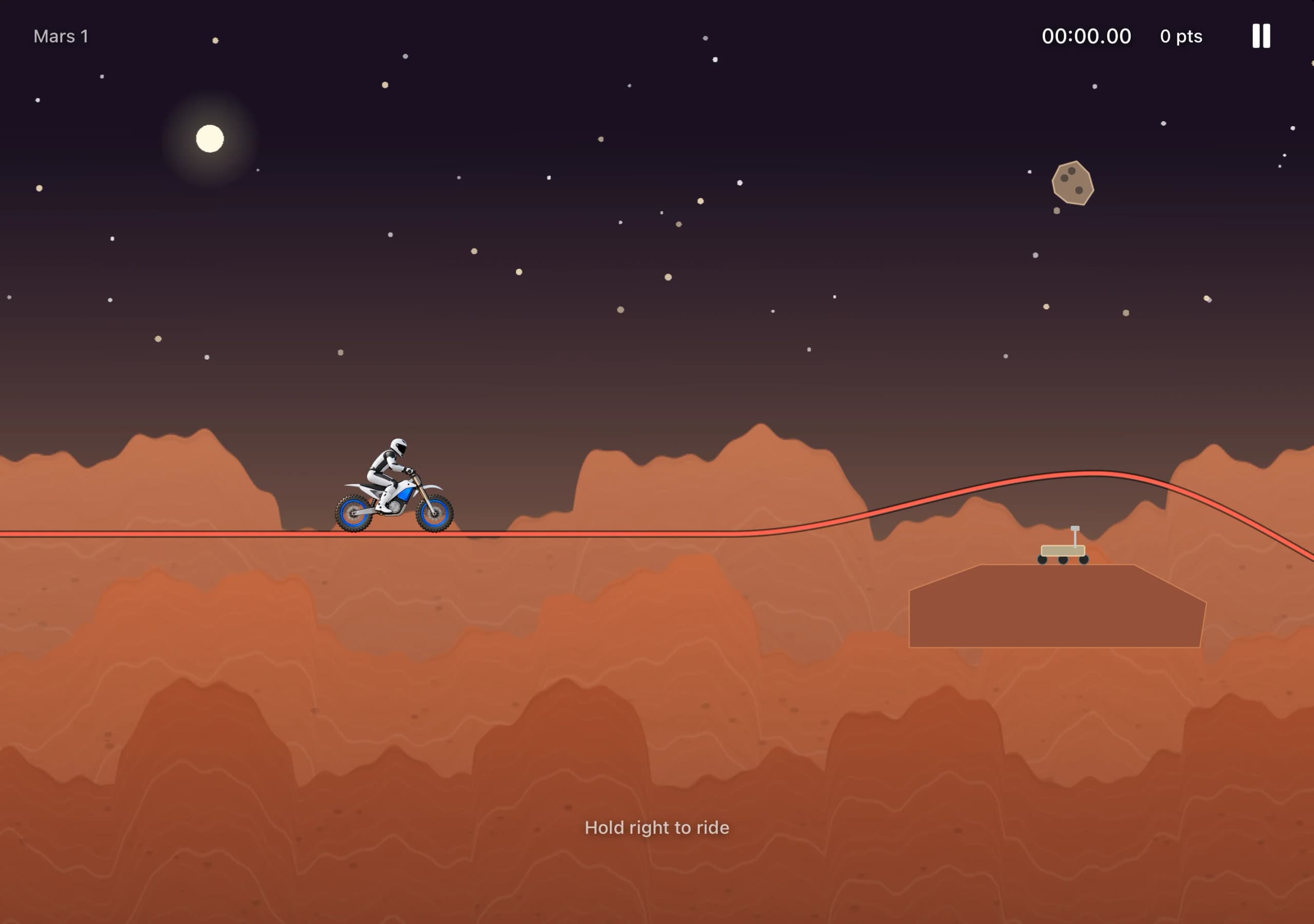
The implemented Mars course in the simulator. The bike assets are reused; the layered Mars scenery is generated in code.
7. Refine what you can actually feel
These are focused versions of my later feedback.
Keep the camera distance, fix the jump transition
Keep the current camera distance. Tilt feels too reactive now, so
soften its response while preserving adjustable sensitivity.

The zoom-out during jumps feels abrupt. Smooth the transition into
and out of airborne framing. Keep the bike and landing visible.

The Moon appears to move suddenly away when I jump. Keep distant
background movement stable during the camera change, and make the
parallax layers move smoothly at their intended relative speeds.Make flips and the background readable
Emit a separate particle burst for every full airborne flip and award
10 points per flip, including two flips in one jump. Don't count a
loop ridden on the track as an airborne flip.

Make the stars a little larger and easier to see. Give Mars multiple
visible terrain layers and bring the scenery higher so most of the
screen is not empty black space. Keep the riding line clear.

Add a brief falling-star celebration when the course is completed.Simplify the menu and calibration
Use a centered black-and-white menu with a subtle Earth or Mars
background. Remove extra instructional text. Make Start riding or
Continue riding the primary white button.

Capture a comfortable neutral phone position automatically when a
ride starts or resumes, instead of asking the player to set it every
time. Keep sensitivity and haptic preferences in a dedicated Settings
screen rather than crowding the gameplay HUD.Make later courses more interesting
Make the later courses more varied and fun. Use climbs, bowls, drops,
real gaps, and jumps with clear landing zones. Add full loops to
selected later courses, with enough approach speed and a readable exit.

Keep the early courses approachable. Check that every course can be
finished with the actual physics and controls, rather than judging
only how the track looks.Optional: adapt layouts for a foldable device.
Adapt the game to the supported device sizes and orientations without
restarting the current ride. In a supported seated foldable posture,
keep gameplay above the fold and place visible controls below it.

When closed and held vertically, let the background fill the display
while keeping essential buttons clear of cutouts and screen edges.
Use the platform's supported layout APIs, and verify the behavior on
the actual target device.8. Test the game on your phone
Build, run, and repeat the same action before and after each change:
Review the current game and run the available build and automated
checks. Report what actually ran, what passed, and what remains untested.

Check acceleration/braking, touch cancellation, calibration,
sensitivity, wheel/track collisions, crash/restart, finish crossings,
and next-course progression. Check that each airborne flip gets one
score event and each landing gets one landing response. Verify reset
behavior after crashes and restarts.

Give me a short physical-device checklist for tilt direction, neutral
position, camera readability, haptic feel, pause/resume, and performance.
Keep simulator evidence separate from hands-on device observations.Check tilt, haptics, and performance on the actual phone. For setup, see Apple's device-running guide and Core Motion documentation.
Video and source code
YouTubeBuild Your First iPhone Game with Codex

Source codeSpace Rider on GitHub